Invoicing & Trade

Invoicing that gets you paid —
from a simple invoice to a full export shipment.

Send your first invoice in minutes — free forever, with estimates, a customer portal, online payments and 30+ currencies. When you outgrow the basics, Launcher adds the Advanced Invoicing Suite — branded templates, a real tax engine, automated dunning, credit notes, retainers, recurring invoices and receivables reports — plus 33 trade & export document types, all generated from one shipment master file. Your invoices live beside your CRM, your calls and your Unified AI, so getting paid is part of the same workflow as closing the deal.

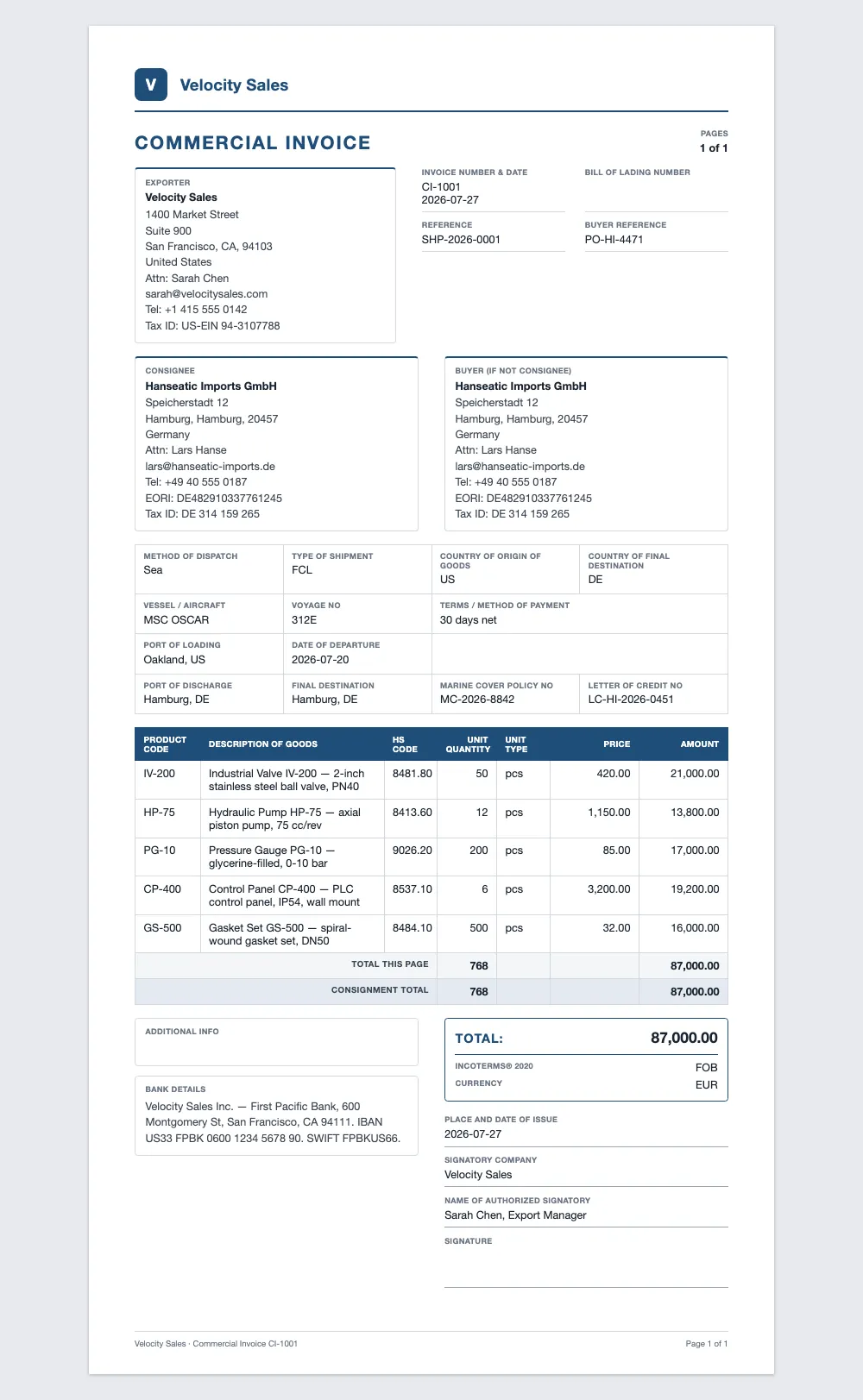
app.clozo.ai/trade/documents/CI-1001
A Clozo commercial invoice PDF with exporter and consignee blocks, line items with HS codes, Incoterms and totals

A Commercial Invoice, Rendered From the Shipment Master File

0
Trade & Export Document Types
0
REST API Methods
0
Receivables & Sales Report Types
30+
Currencies, FX-Normalized in SQL
Invoice document icon - free invoicing

Everything You Need to Get Paid, at $0

The core invoicing platform is on every plan, including the permanent Free one — no document caps, no per-invoice fees, no credit card to start.

Invoices & Estimates

Unlimited invoices and estimates with your logo, line items, discounts and notes. Convert an accepted estimate into an invoice in one click.

Customer Portal

Every document carries a secure portal link — customers view, pay, accept or decline, comment and see their full statement of account. No login needed.

Online Payments

Collect by card or bank transfer through Stripe, right from the invoice. Partial payments are tracked against the open balance automatically.

Multi-Currency

Invoice in 30+ currencies with a per-document currency. Every revenue figure is FX-normalized in SQL before it's summed, so mixed-currency totals stay correct.

PDFs & Email Delivery

Clean, printable PDFs for every document, delivered by email with the portal link — or shared as a secure link you paste anywhere.

E-Signature Acceptance

Customers accept estimates with a drawn e-signature right on the portal page. Every acceptance is timestamped and stored with the document.
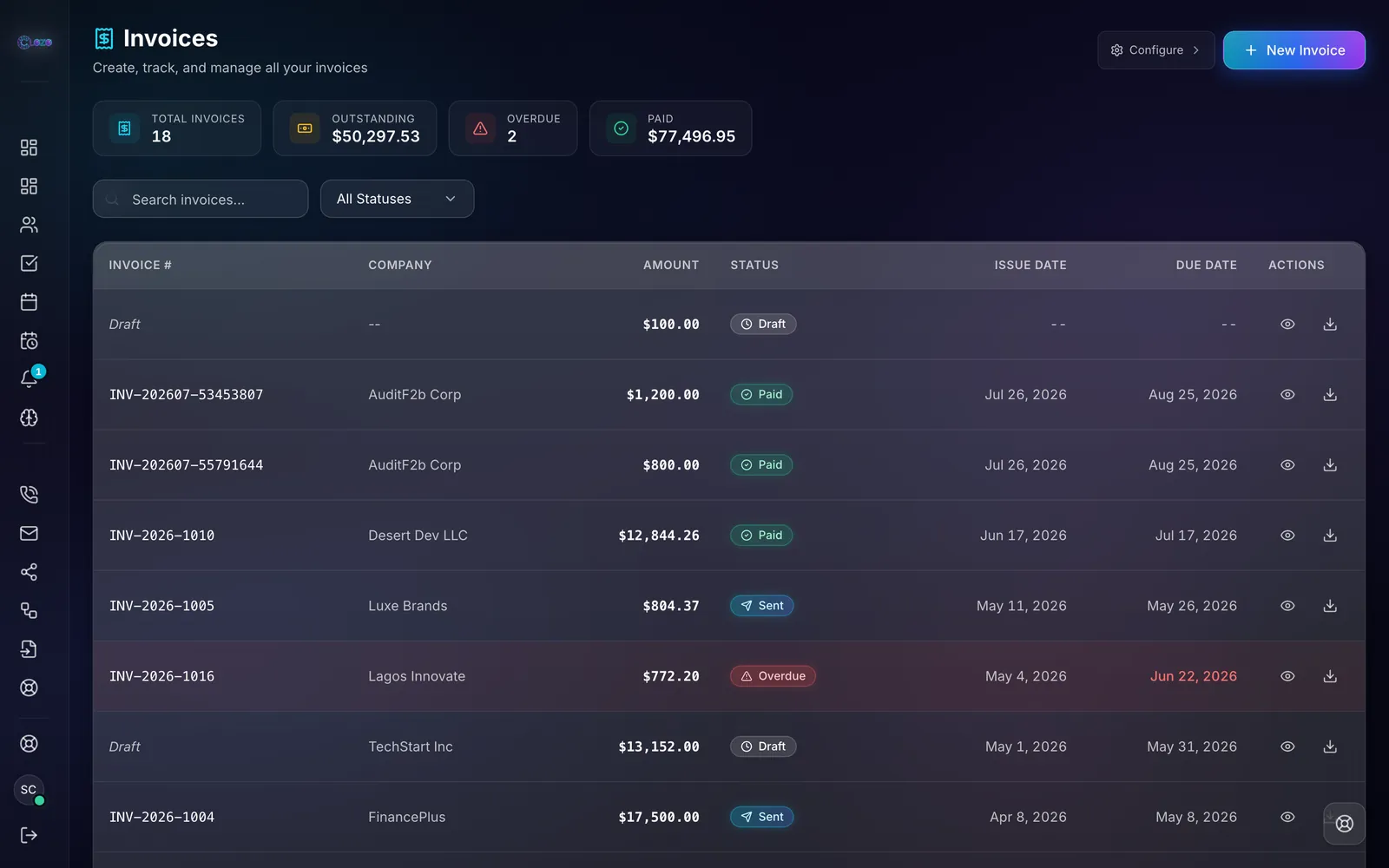
app.clozo.ai/invoices
Clozo invoices hub listing invoices with amounts, statuses — paid, sent, viewed, overdue, partially paid — and totals for outstanding and paid

Every Invoice, Every Status, One List

Settings gear icon - advanced invoicing suite

When Invoicing Becomes a System

From Launcher ($79/user/mo), invoicing grows up: branded documents, a real tax engine, automated collections and the reports your accountant actually asks for.

Branded Templates & Numbering

Your logo, colors and header/footer text on every PDF — plus custom prefixes and per-type numbering sequences (INV-, EST-, CN-…).

Tax Engine

Per-line tax rates, tax groups, compound taxes and exemptions — with a per-rate breakdown stored on every document for clean filing.

Reminders & Dunning

A reminder ladder before and after the due date sends itself, and invoices flip to overdue automatically. Stop chasing payments by hand.

Credit Notes

Issue credit notes against any invoice and apply them to open balances — the customer's statement always shows what they actually owe.

Challans & Retainers

Delivery challans for goods in transit and retainer invoices for advance payments — tracked right beside your regular invoicing.

Recurring Invoices

Set the schedule once and invoices generate themselves — weekly, monthly, quarterly or yearly — for retainers, subscriptions and standing orders.

Expenses → Invoice

Log billable expenses as they happen and convert them straight into invoice line items, so nothing you paid for goes uninvoiced.

Reports & AR Aging

AR aging, sales by customer, sales by item, payments received and tax summary — every report one click from a CSV export.
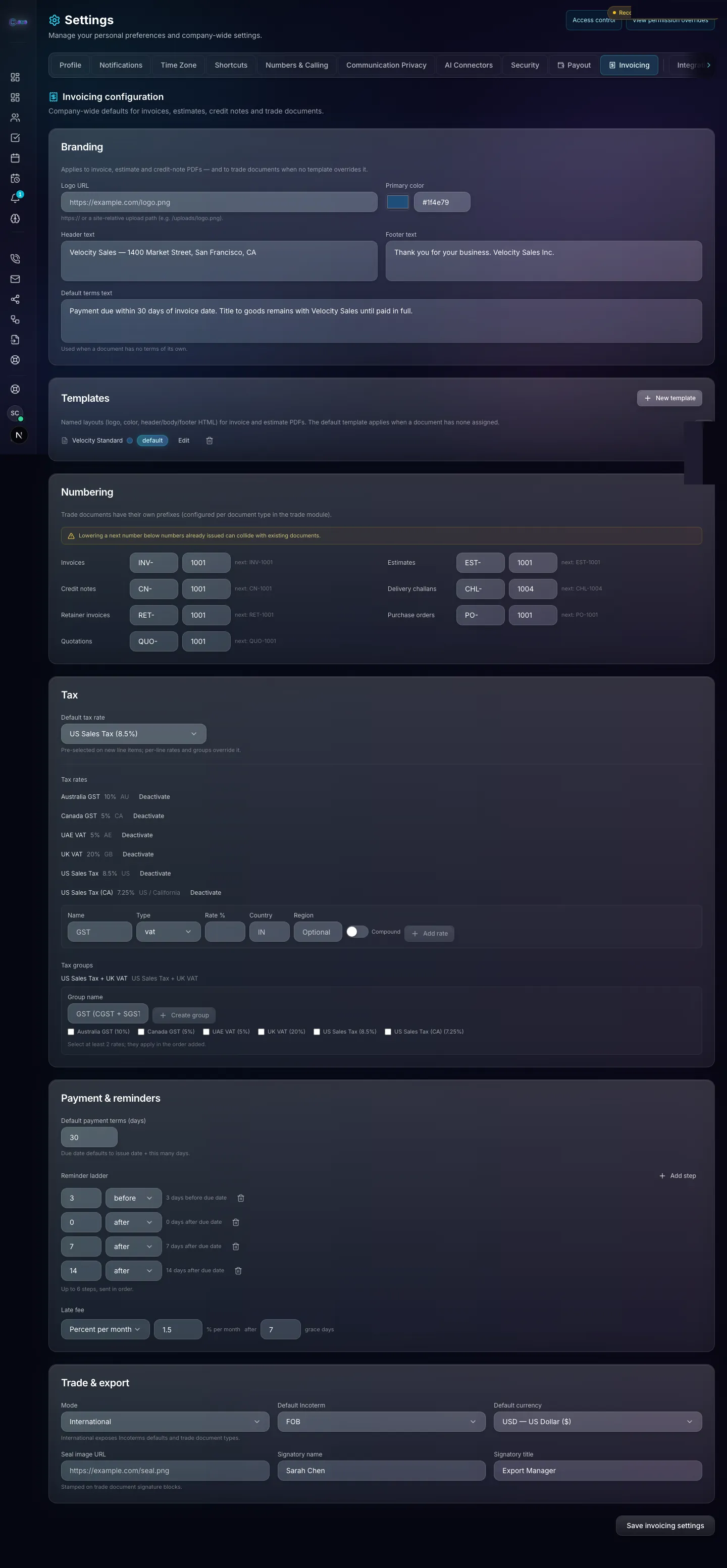
app.clozo.ai/settings/invoicing
Clozo invoicing settings: branding, PDF templates, per-type numbering sequences, tax rates and groups, payment reminder ladder and trade defaults

Branding, Numbering, Tax, Reminders & Trade Defaults — One Settings Page

Shipping icon - trade and export documents

One Shipment. 33 Documents. Zero Re-Typing.

Every export shipment in Clozo starts with a master file — exporter, consignee, notify parties, carrier, vessel, ports, Incoterms, payment terms, bank details and the item list, entered exactly once. All 33 trade & export documents read from that same master file, so the commercial invoice, the packing lists and the bill of lading can never disagree. Change the consignee once and the whole set stays in sync.
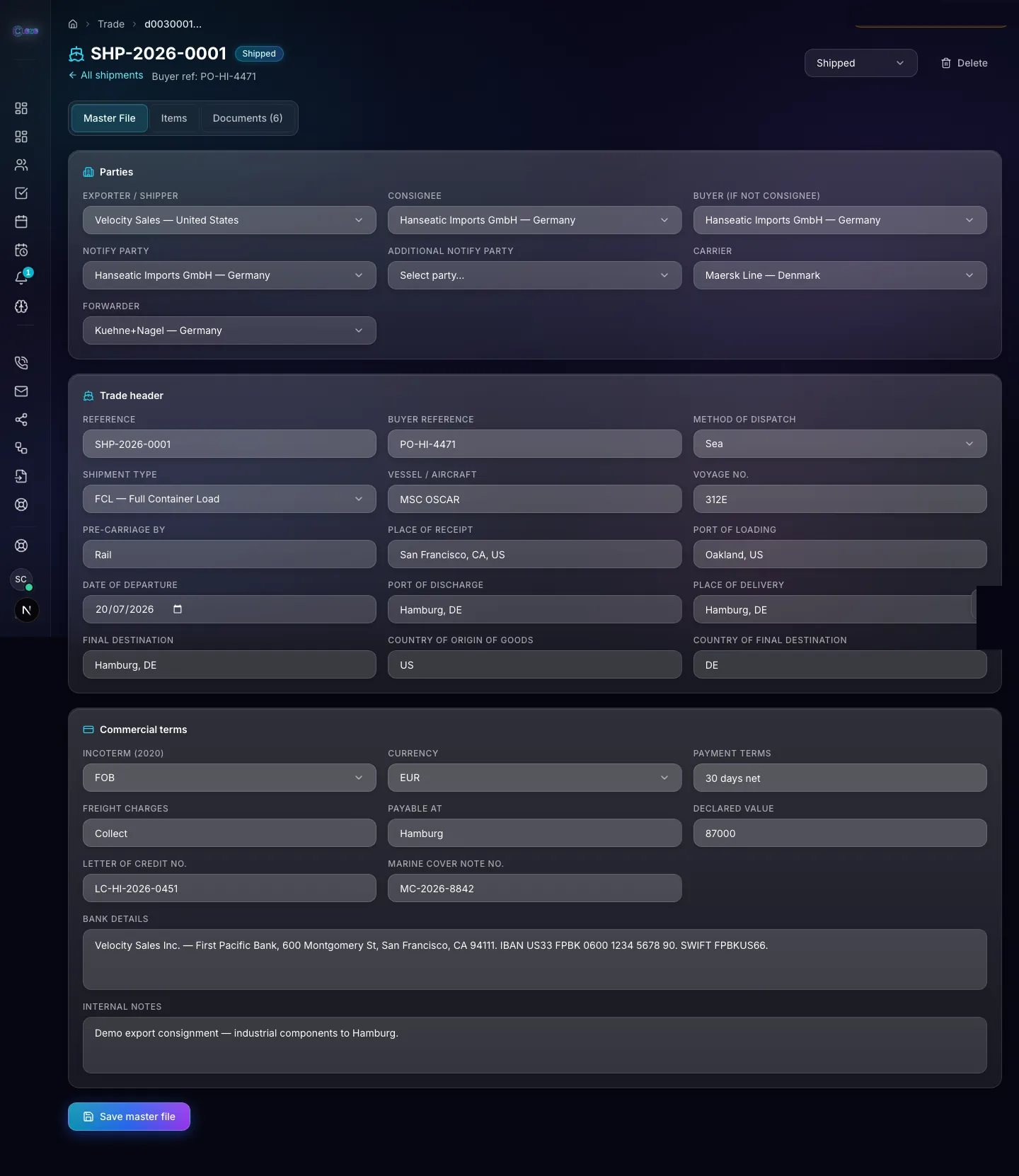
app.clozo.ai/trade/shipments/SHP-2026-0001
Clozo shipment master file with parties, trade header, vessel and ports, Incoterms, currency, payment terms and bank details entered once

The Shipment Master File — Enter It Once

Commercial — 9 types

Commercial Invoice Proforma Invoice Quotation Request for Quotation Sales Contract Sales Confirmation Purchase Order Tax Invoice Credit Note

Packing Lists — 4 types

Packing List (Simple) Packing List (Detailed) Packing List (Consolidated) Packing List (Container)

Transport & Instructions — 4 types

Bill of Lading Shipping Instruction Forwarding Instruction Shipper's Letter of Instruction

Origin & Declarations — 8 types

Certificate of Origin Declaration of Origin USMCA Certification of Origin Packing Declaration Verified Gross Mass Declaration New & Unused Declaration Non-Asbestos Declaration Generic Declaration

Regulatory — 7 types

Importer Security Filing (ISF 10+2) Phytosanitary Certificate CMR Consignment Note (Sender) CMR Consignment Note (Consignee) CMR Consignment Note (Carrier) Form 6 — Transboundary Movement Form 9 — Transboundary Movement

Financial — 1 type

Bill of Exchange

Enter Once, Sync Everywhere

Parties, vessel, ports, Incoterms and bank details live in the master file. Every document in the set reads from it — no copy-paste, no contradictions.

Automatic Packing Math

Cartons, weights and volumes are computed from your items and packing setup — totals always agree across packing lists, the B/L and the VGM declaration.

Counter-Signing & Company Seal

Share any document with a public link — the counterparty reviews and counter-signs with e-signature, and your company seal stamps the final PDF.

Combined PDF & Share Links

Download the entire document set as one combined PDF for the bank or the forwarder — or share individual documents as tracked public links.
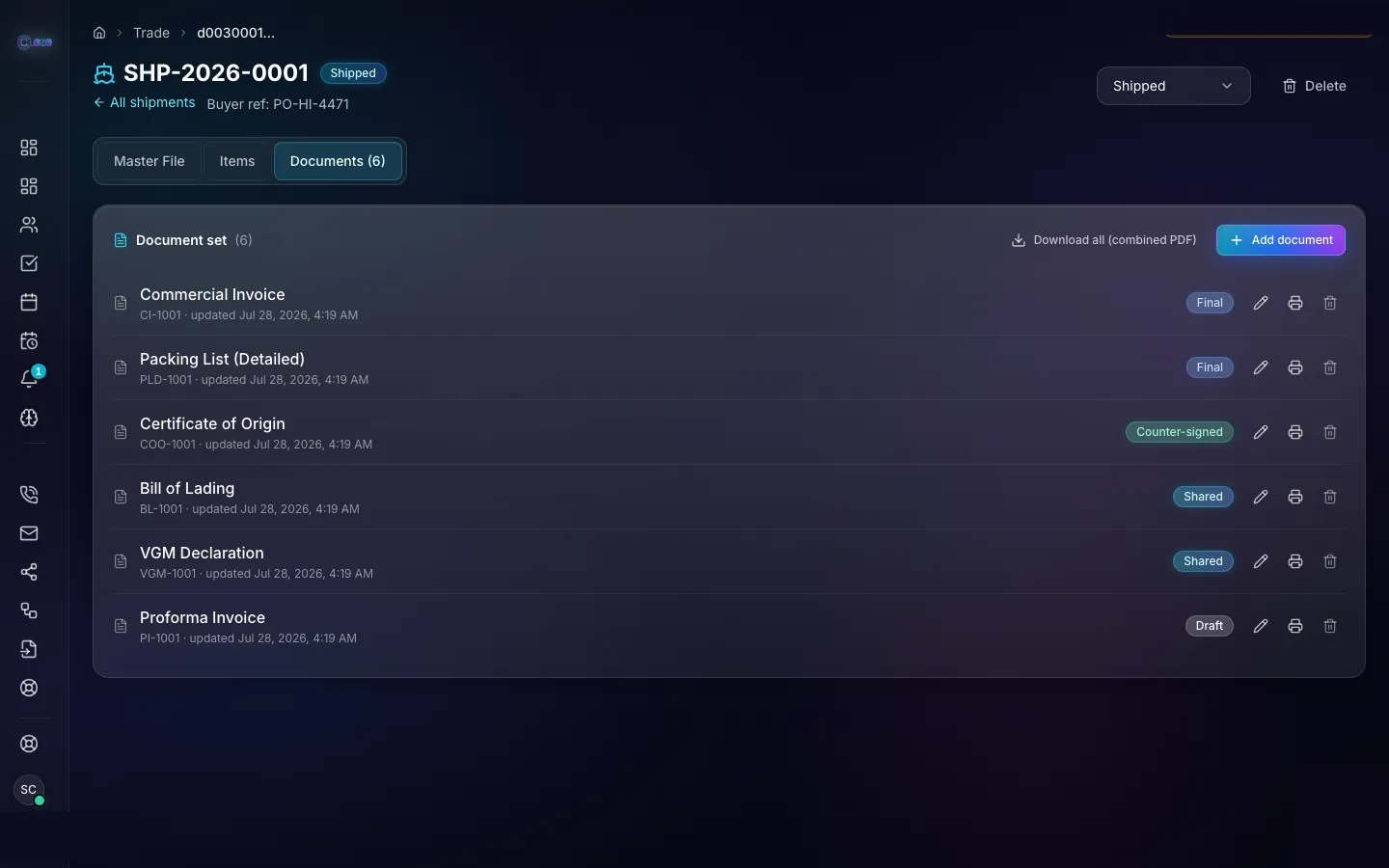
app.clozo.ai/trade/shipments/SHP-2026-0001/documents
A Clozo shipment's document set — commercial invoice, packing list, certificate of origin, bill of lading, VGM declaration and proforma — with statuses and a combined-PDF download

The Whole Document Set, One Shipment Deep

Customer portal icon

Your Customers Get a Portal, Not a PDF Attachment

Every invoice, estimate and trade document carries a secure public link. The portal is where your customer does everything — no account, no password, no "can you resend that?"
  • Statement of account — every invoice, payment and credit note in one view
  • Partial payments against the open balance, tracked automatically
  • Accept or decline estimates with a drawn e-signature, timestamped and stored
  • Comment threads on the document — questions answered where the document lives
  • Counter-signing for trade documents, with your company seal on the final PDF
  • Download clean PDFs any time — branded with your logo on Launcher
Try the Portal Free
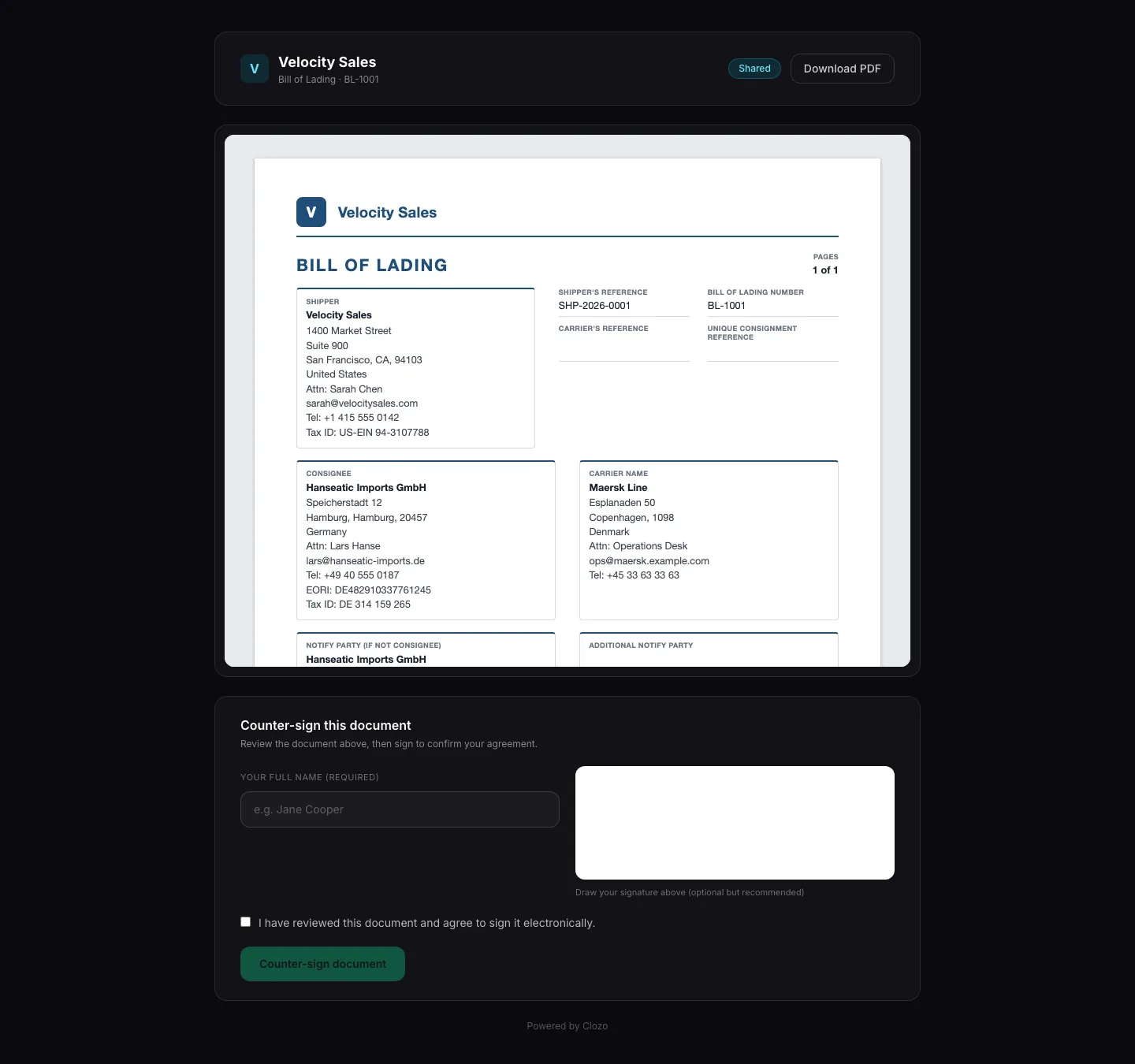
share.clozo.ai/docs/BL-1001
Public Clozo share page for a bill of lading with document preview, download PDF button and a counter-sign form with e-signature pad

The Public Share Page — Review, Download, Counter-Sign

Developer toolbox icon - API and webhooks

Built to Be Automated

Everything you can do in the UI, you can do from code — 146 REST API methods across invoices, estimates, payments, credit notes, shipments and trade documents, outbound webhooks for every lifecycle event, and a Unified AI that answers invoicing questions and takes actions through approval cards.

REST API — 146 Methods

Create invoices, record payments, issue credit notes and generate trade documents from your own systems. Read-only access from Scaler, full read/write from Conqueror.

curl https://api.clozo.ai/v1/invoices \ -H "Authorization: Bearer $CLOZO_API_KEY"

Outbound Webhooks

Signed events for the moments that matter, delivered to your endpoints:

invoice sent invoice viewed invoice paid invoice overdue estimate accepted estimate declined credit note issued document counter-signed

Unified AI for Invoicing

Ask in plain English; approve the action. Nothing sends without your confirmation.

  • “Which invoices are more than 30 days overdue?”
  • “Draft a payment reminder for Hanseatic's open balance.”
  • “Create an invoice for 40 units of HP-75 to Acme GmbH.”

Start Free. Upgrade When You Ship More.

Core invoicing is free forever. The advanced suite and the trade documents are where Launcher earns its $79.

What you get
Free $0 Forever
Launcher
Core Invoicing
Invoices, estimates, customer portal, online payments, multi-currency, PDFs & e-signature
Everything in Free
Advanced Invoicing Suite
Not included
Branded templates & numbering, tax engine, dunning, credit notes, challans, retainers, recurring invoices, expenses → invoice, reports
Trade & Export Documents
Not included
All 33 document types from one shipment master file, with counter-signing, company seal and combined PDF
Clozo
Target icon - get paid faster

Send the Invoice. Get Paid.

Free invoicing forever — estimates, portal, payments and PDFs included. When you need the tax engine, dunning and 33 export documents, Launcher is $79/user/mo with 30 days free.

Frequently Asked Questions

Yes. Core invoicing is free forever on the permanent Free plan — unlimited invoices and estimates, a customer portal where clients view, pay, accept or decline with e-signature, partial payments, statements of account, multi-currency, PDFs and email delivery. The Advanced Invoicing Suite (branded templates, tax engine, dunning, credit notes, retainers, recurring invoices and reports) and the 33 trade & export document types unlock on Launcher at $79 per user per month.
33 document types across six categories: commercial (commercial invoice, proforma, quotation, RFQ, sales contract, sales confirmation, purchase order, tax invoice, credit note), four packing lists (simple, detailed, consolidated, container), transport documents (bill of lading, shipping and forwarding instructions, shipper's letter of instruction), origin and declarations (certificate of origin, USMCA certification, VGM and packing declarations and more), regulatory (ISF 10+2, phytosanitary certificate, three CMR consignment notes, Forms 6 and 9), and a bill of exchange. Every document in a shipment reads from one shared master file, so data is entered once.
Every invoice carries a secure customer-portal link — no account required. Customers review the document, pay by card or bank transfer through Stripe, make partial payments against the balance, download PDFs, see their full statement of account, and accept or decline estimates with a drawn e-signature. Comments on the document keep questions where the document lives.
Yes. You can invoice in 30+ currencies with a per-document currency, and every revenue figure is FX-normalized in SQL before it is summed, so mixed-currency reports still total correctly. On Launcher, a full tax engine adds per-line tax rates, tax groups, compound taxes and exemptions, with a per-rate breakdown stored on every document.
The shipment master file is the single source of truth for an export consignment: exporter, consignee, notify parties, carrier, vessel, ports, Incoterms, payment terms, bank details and the item list. All 33 trade documents read from it — change the consignee once and the commercial invoice, packing lists, bill of lading and certificates all stay in sync. Packing math (cartons, weights, volumes) is calculated automatically from your items.
Yes. Clozo exposes a REST API with 146 methods covering invoices, estimates, payments, credit notes, shipments and trade documents, plus outbound webhooks for lifecycle events like invoice viewed, paid and overdue, and trade document counter-signed. Unified AI also answers invoicing questions in plain English and takes actions — like drafting a reminder or creating an invoice — through approval cards you confirm before anything sends.
30 days free — cancel anytime
Launcher $79/mo
Scaler $199/mo
Conqueror $499/mo
Closer $999/mo
Start Free Trial